On Kubernetes and some footguns
By Antonio Cheong on on Permalink.
I've been running my own Kubernetes cluster for a few weeks now and thought I'd document my thoughts and things I ran into.
Premise
I self host pretty much every service I use - email, calendar, password manager, matrix, etc. Hosting is expensive, so my approach has been to have everything running on Raspberry Pis, spare laptops, and jailbroken Kindles with a few tiny rented servers for ingress.
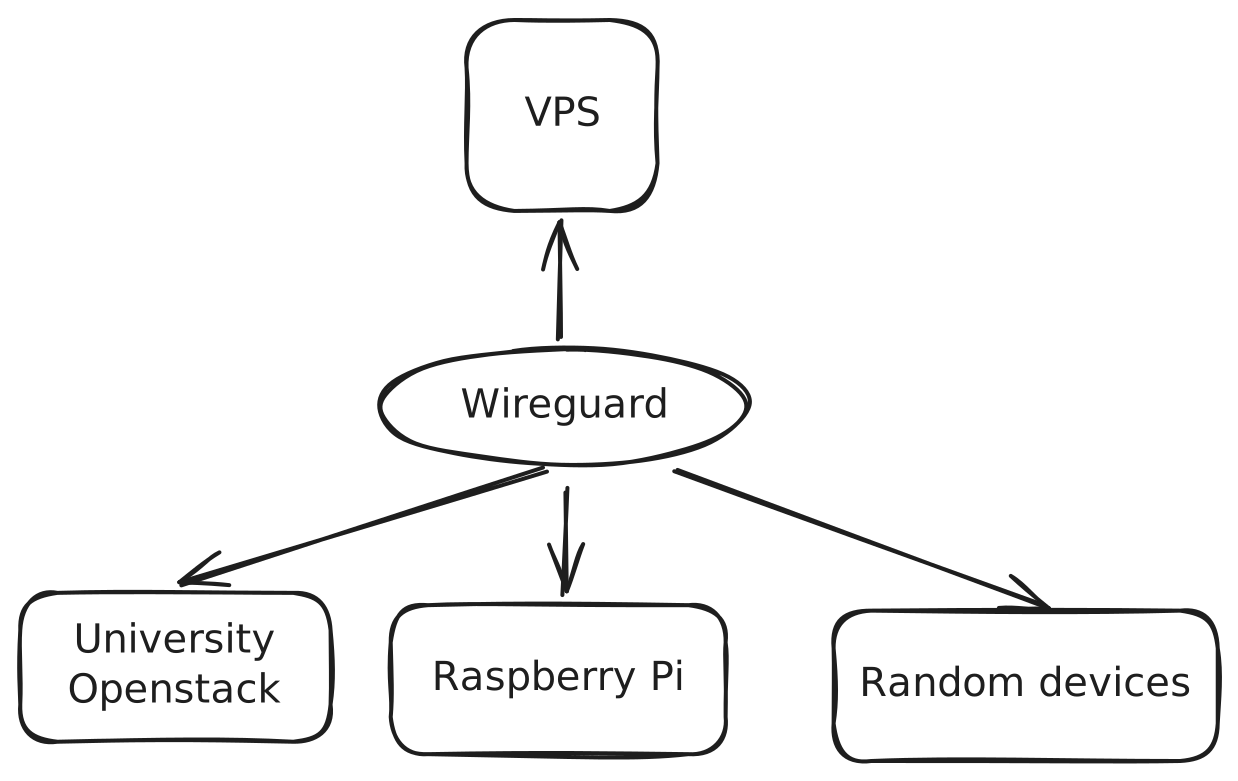
One major flaw of this approach is data loss. Many of the devices are simply not reliable and sometimes sitting halfway around the world in my grandparent's house. If it crashes, there is simply no way to recover anything. This happened multiple times and caused me to lose my Vaultwarden instance along with all my passwords. Thankfully they were cached in my browser but it could've been a huge disaster. I also host an invidious instance with a couple hundred daily users for which I need to set up load balancing to handle the bandwidth and avoid IP bans.
I at first tried writing my own Kubernetes-esq software that imitated fly.io's CLI and parsed a subset of docker-compose.yml to spawn podman containers, made a badly written nameserver, and used Caddy's API to handle proxying/TLS. To avoid data loss, all volumes were periodically exported and saved on a specific server since all the others simply didn't have enough storage - actually restoring from backups was never implemented. Overall, it was a horrid mess full of hacks specific to my setup.
While looking into distributed storage, I found longhorn which solved just about everything I wanted. I had been holding off on learning Kubernetes due to the perceived difficulty, but considering the amount of effort it took just to not use it, might as well.
I was initially considering microk8s since it offered a collection of common addons which I wouldn't have to deal with myself. However, it is extremely tied to snaps and contains hard coded paths that simply forces it to not work outside of snaps. I absolutely detest snaps - they're slow to start, take too much RAM and disk, automatically updates without permission, and is proprietary to Canonical, essentially the Microsoft of Linux.
So k3s it is - A single static binary, supposedly lightweight, and written in Golang, which is always a plus since I can dig into the code and contribute if necessary. Before even getting started, I tried migrating the UrfaveCLI dependency to v3 and support fish completion to get a feel for the codebase. Due to heavy integration with containerd which still relies on v2, it wasn't possible - but overall I liked how the code was structured.
Footguns
k3s does not forward the real client IP
This means that if you try to use something like crowdsec or fail2ban for rate limiting, it will ban the internal IP of traefik and block all traffic.
In kubernetes, a load balancer pod is tied to only a single node, which may or may not be the one actually taking in traffic. When any traffic reaches a node, it is passed through servicelb to reach the one actually hosting the ingress controller, and by doing so, masks the originating IP.
It's not possible to determine the assigned external IP and ensure the load
balancer deployment is deployed onto the same node. Instead, you must set the
deployment as DaemonSet and use nodeSelector to create replicas on every
node with an external IP given to metallb. For the load balancer service, also
ensure externalTrafficPolicy: Local and disable servicelb by adding
--disable servicelb to the k3s service.
Here
is the values I use for traefik as an example.
Longhorn: failed to connect to unix://csi/csi.sock
There are multiple reasons this might occur, some of which are well documented. e.g. iscsi-initiator-utils or open-iscsi needs to be installed.
However, there are also really obscure and misleading reasons - in my case, a failing tailscale route. If you have nodes behind a NAT, k3s offers tailscale integration - which I use with my own headscale instance. At first, I manually approved every route via the UI but they seem to be reissued every time k3s restarts, causing the csi error despite having nothing to do with unix sockets.
The solution was to use acls to auto approve these routes. Keep in mind that
with headscale you need to manually tag the nodes with
headscale nodes tag -i <ID> -t tag:cluster.
{
  "tagOwners": {
    "tag:cluster": ["autogroup:admin"],
    "tag:ci": ["autogroup:admin"]
  },
  "autoApprovers": {
    "routes": {
      "10.42.0.0/16": ["tag:cluster"]
    }
  },
  "acls": [
    {
      "action": "accept",
      "src": ["tag:owner", "0.0.0.0"],
      "dst": ["*:*"]
    },
    {
      "action": "accept",
      "src": ["tag:cluster", "10.42.0.0/16"],
      "dst": ["tag:cluster:*", "10.42.0.0/16:*"]
    }
  ]
}
# /etc/headscale/config.yaml
policy:
  mode: file
  path: '/etc/headscale/acl.json'
Resource consumption
k3s with a single master node takes up around 1GB of memory by itself while the agent takes up around 200MB, not very lightweight at all. Longhorn takes a further 500MB per node. Overall, you want at least 2GB of memory in the most optimistic scenario, even for agents. With multiple master nodes, etcd takes up significantly more memory, especially on secondary master nodes. Even more damaging is that a single unhealthy master node will cause other master nodes to go offline, possibly due to failed elections and increased load. Unless you have at least 4GB of RAM on each master node, I would not recommend having more than one master node. If using crowdsec, make sure to disable the dashboard. Metabase (java) will take up 1GB of RAM even if left unused.
Tailscale causes a complete disconnect on OpenStack
In specific setups on OpenStack, starting k3s-agent will immediately cause you
to lose ssh access and brick the instance. To recover, reboot the machine and
ensure /etc/resolv.conf is properly set. Then prevent tailscale from taking over
DNS by running sudo tailscale set --accept-dns=false and restarting
tailscaled.
Crowdsec fails to make any decision
I assume you followed the example from crowdsec-bouncer-traefik-plugin. Traefik no longer defaults to JSON logs, set
logs:
  access:
    enabled: true
    format: json
in traefik-values.yaml.