[WIP] On the Privacy of Apple Location Services & Analytics
Btw this is a sequel to some of my prior research on how the location services work. See https://github.com/acheong08/apple-corelocation-experiments/
Background
Contrary to popular belief, GPS is no longer the primary method mobile devices use to determine location.
Instead, companies like Google and Apple maintain massive databases of Wi-Fi hotspots and cell towers. Phones collect signals from these beacons - including strength and identifiers - and use them to triangulate their position, with the help of data provided by these vendors.
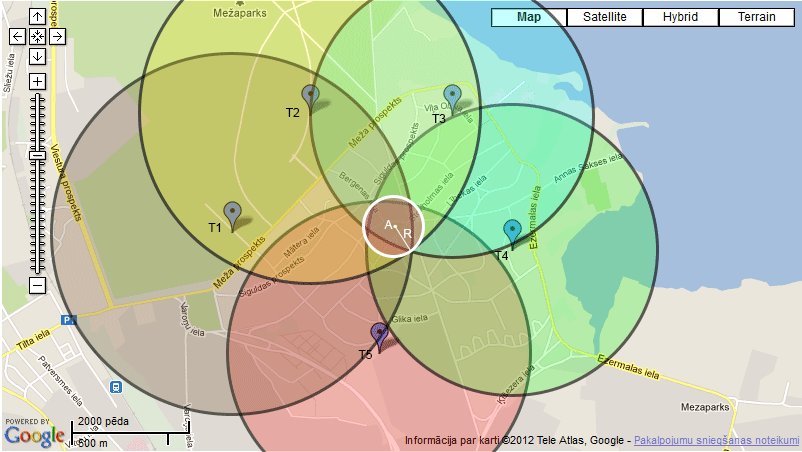
To build these databases, iOS and Android devices act as passive wardrivers: they continuously report nearby access points to Apple and Google. This data is then aggregated across countless devices to determine the locations of access points with high accuracy.
A recent paper, "Surveilling the Masses with Wi-Fi-Based Positioning Systems" (May 2024), explores how Apple’s location services can be weaponized to track movements worldwide - particularly in sensitive contexts like war zones and natural disasters.
I found the paper fascinating. On the same day it was published, I began reverse
engineering the clls/wloc endpoint using definitions decompiled from
CoreLocationProtobuf.framework. Over the following weeks, I uncovered
additional endpoints, such as:
wifi_request_tile: retrieves BSSIDs in a given area via an obfuscated tile keyhcy/pbcwloc: uploads data about newly discovered endpoints
By combining the tile endpoint with an expanding search algorithm layered on
top of wloc, I was able to reproduce the dataset described in the paper within
a single day.
With the external dataset re-created, the next question was: how much data is
actually being sent to Apple from devices in the first place?
I’m writing this from the University of Cambridge, where I’m spending three
weeks on a research project exploring exactly that.
Reverse Engineering the Protocols
Apple relies on a custom RPC format known as ARPC. Unlike typical self-describing formats, ARPC does not embed enough information to fully decode requests and responses on its own.
A standard request has the following structure:
| Field | Size | Type | Description |
|---|---|---|---|
| Version | 2 bytes | uint16 | Protocol version |
| Locale | variable | pascal string | Locale string |
| AppIdentifier | variable | pascal string | Application identifier string |
| OsVersion | variable | pascal string | OS version string |
| FunctionId | 4 bytes | uint32 | Function ID |
| Payload Length | 4 bytes | uint32 | Length of payload |
| Payload | variable | bytes | Payload data |
Responses are trickier: they can contain an arbitrary number of fields of unknown sizes. To parse them, one can exploit the fact that the payload length encodes the number of bytes from its position to the end of the message. Practically, this means scanning the response with a sliding 4-byte window, checking if each candidate encodes a valid remaining length. If multiple candidates match, the largest valid body size and corresponding header size are chosen.
Working Out the Protobuf
The payload itself can contain any arbitrary bytes - including encrypted blobs - but in most observed cases it uses protobuf. The next challenge is discovering the protobuf definitions.
Tools like protodump can extract protobuf file descriptors from raw binaries, but they don’t work with Apple’s custom compiler, which converts protobuf definitions directly to Objective-C.
Most of the protobuf decoding logic isn’t located in the locationd, geod, or
geoanalyticsd binaries themselves. Instead, it resides in private frameworks
inside the dyld cache. To extract them, use
dyld-shared-cache-extractor.
To fetch the filesystem image for iOS, use
ipsw:
ipsw download ipsw --version 18.6.2 --device iPhone15,2
ipsw extract --files --pattern ".*" iPhone15,2_18.6.2_22G100_Restore.ipsw
On macOS, the iOS Simulator runs its system binaries natively, which allows
attaching lldb - but only with SIP (System Integrity Protection) disabled.
ps aux | grep simruntime | grep locationd   # Find the PID of locationd running within the simulator
sudo lldb -p <pid>                          # Attach to process (requires SIP disabled)
br set -n "-[NSURLSessionTask resume]"      # Set breakpoint on network requests
po [$x0 originalRequest]                    # Inspect request details (e.g. URL)
The next step is mapping addresses in Ghidra.
To find the base load address, run:
image list <binary name, e.g. geoanalyticsd>
Then, from the backtrace, take the top frame address that matches your binary.
Subtract the base load address to get a file offset, then add 0x100000000 to
obtain the virtual address expected by Ghidra.
Example:
p/x 0x1048ddda0 - 0x1048d4000 = 0x9da0
p/x 0x100000000 + 0x9da0      = 0x100009da0
Finally, in Ghidra: Navigation > Go To → paste the calculated address.
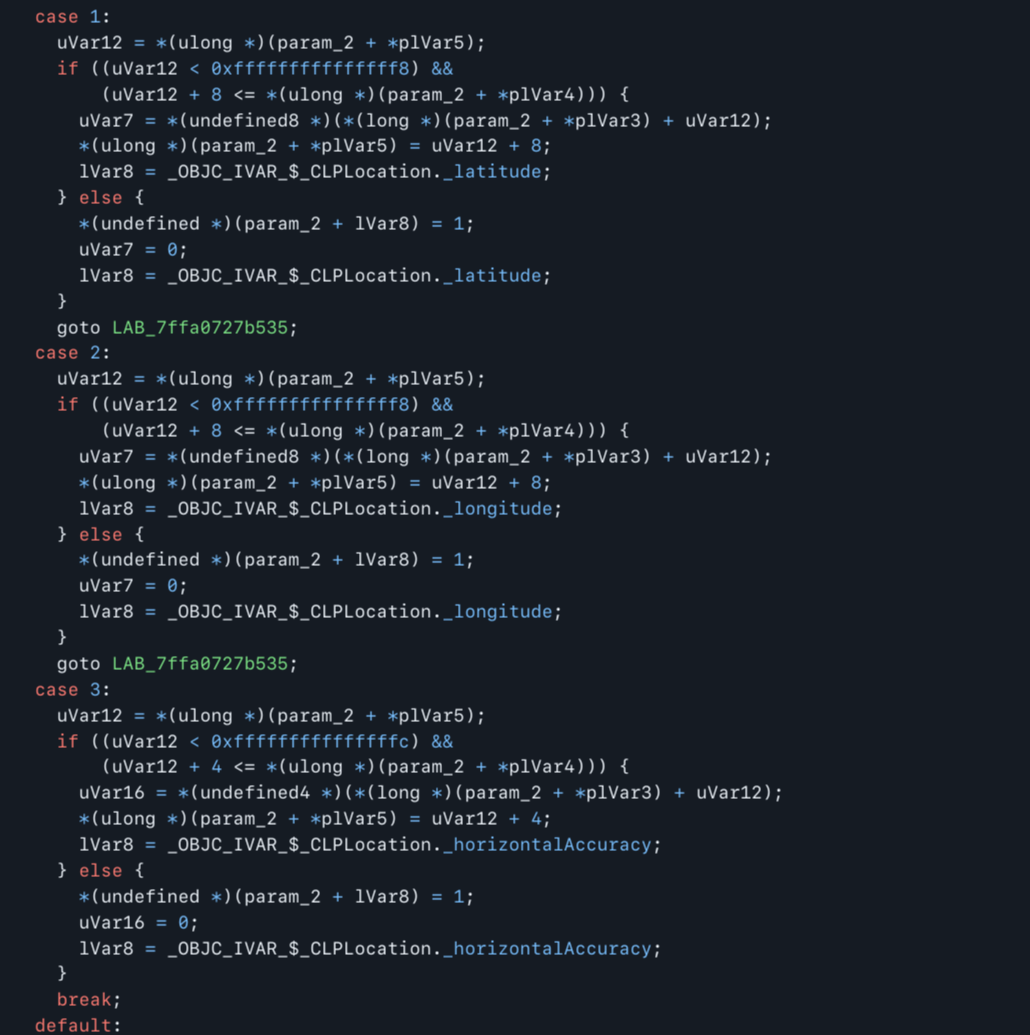
Using the index numbers and associated symbols, the protobuf definition can then be manually reconstructed. With protobuf definitions in hand, we can now find exactly what data is getting sent off to Apple.
Privacy Settings and Observed Traffic
Long story short: under Privacy & Security > Location Services > System Services, it’s worth turning off at least the following options:
- Routing & Traffic
- Apple Pay Merchant Identification
- Improve Maps
- iPhone Analytics
So what is collected?
Lets start off with what Apple claims.
Routing & Traffic: While you are in transit (for example, walking or driving), your iPhone will periodically send GPS data, travel speed and direction, and barometric pressure information in an anonymous and encrypted form to Apple... Additionally, when you open an app near a point of interest (for example, a business or park) your iPhone will send location data in an anonymous and encrypted form...
Apple Pay Merchant Identification: Your iPhone will use your current location to help provide more accurate merchant names when you use your physical Apple Card.
Improve Maps: Apple will collect the GPS coordinates obtained through the Significant Locations feature on your device and correlate them with the street address associated with your Apple Account... Your iOS, iPadOS, or visionOS device will also periodically send locations of where and when you launched apps, including the name of the apps, in an anonymous and encrypted form to Apple in order to improve Maps and other Apple location-based products and services.
So in summary, GPS location, transaction information from NFC, your street address even if not present, and when & where apps were launched. While this isn't great, the fact that it is "anonymous", "encrypted", and periodic should hopefully make traffic impossible to tie to an identity.
Of course words mean nothing without data. Lets make use of the reverse engineering and decode what Apple is sending off.
Data Collection and Analysis
To analyze Apple's location service traffic, I intercepted HTTPS requests from
an iPhone running IOS 18.6.2 with default settings over the course of 7 days
using mitmproxy's WireGuard mode. The device was used as a normal daily driver
(apps opened, routes walked, payments made).
mitmweb --web-host 100.64.0.7 --mode wireguard --set allow_hosts="mitm\.it|.*\.ls\.apple\.com|gs-loc\.apple\.com" --listen-host 167.99.85.207 -w apple.flow --set view_filter="mitm\.it|.*\.ls\.apple\.com|gs-loc\.apple\.com"
Efforts were made to ensure only traffic for location services were captured and to prevent decryption of irrelevant data.
Routing & Traffic
The primary endpoints associated with this setting are:
-
https://gsp10-ssl.apple.com/pds/pd. Contains a large array of a structure containing GPS coordinates, timestamps, and other sensor measurements. -
https://gsp10-ssl.apple.com/au. Contains a list of app bundle identifiers, GPS coordinates, and timestamps
- Between 3 and 4 requests were observed per day varying from 1.5kb to 124kb in size, directly corresponding to the number of steps taken since the previous request
- The GPS locations are highly accurate and not obfuscated with technology like differential privacy. I could spot the exact table I sat at events and the general room I stayed in.
- Requests to the 2 endpoints are usually made within milliseconds of each other.
Data is collected, aggregated, and sent in batches, tying lots of unique data points together.
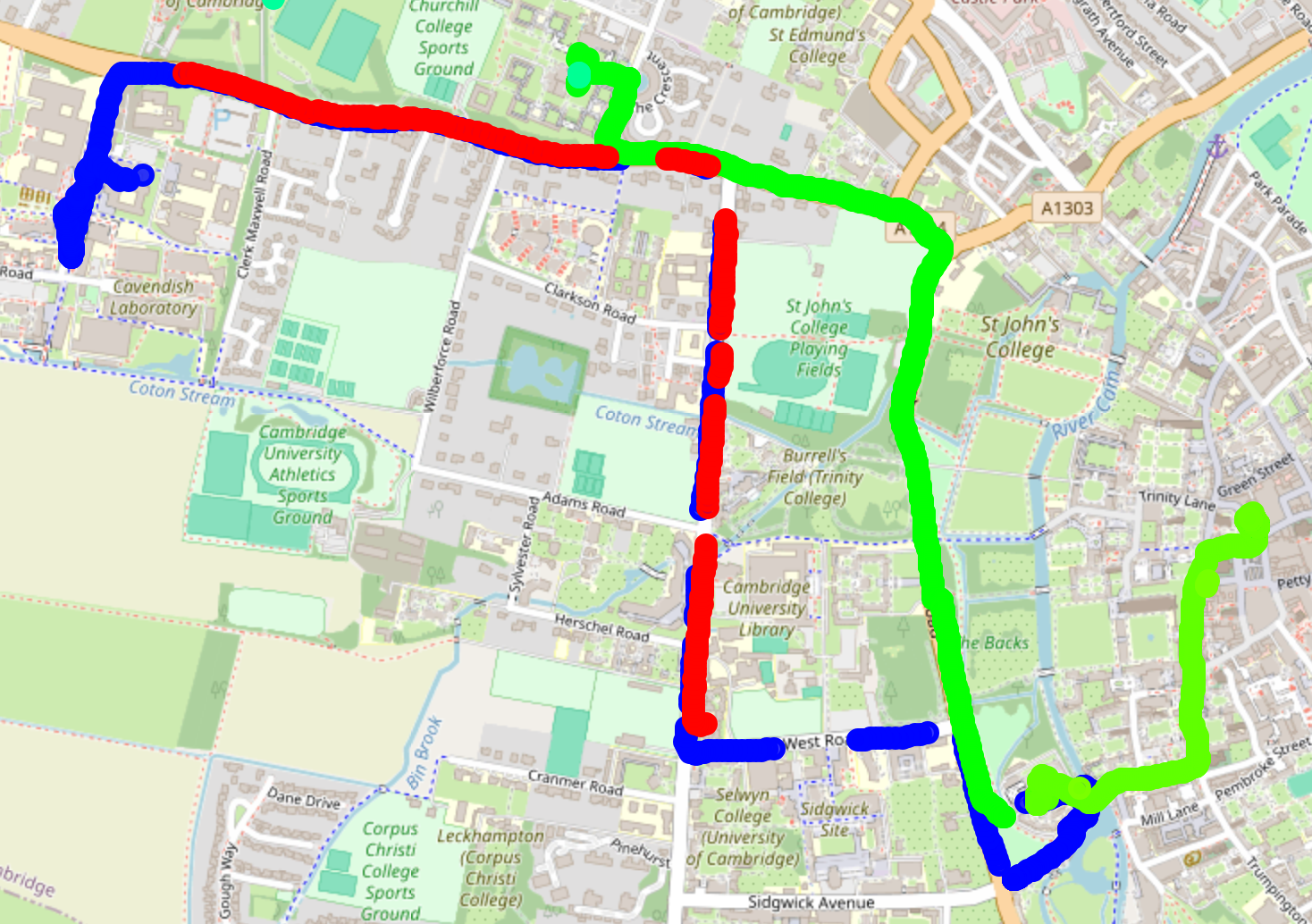
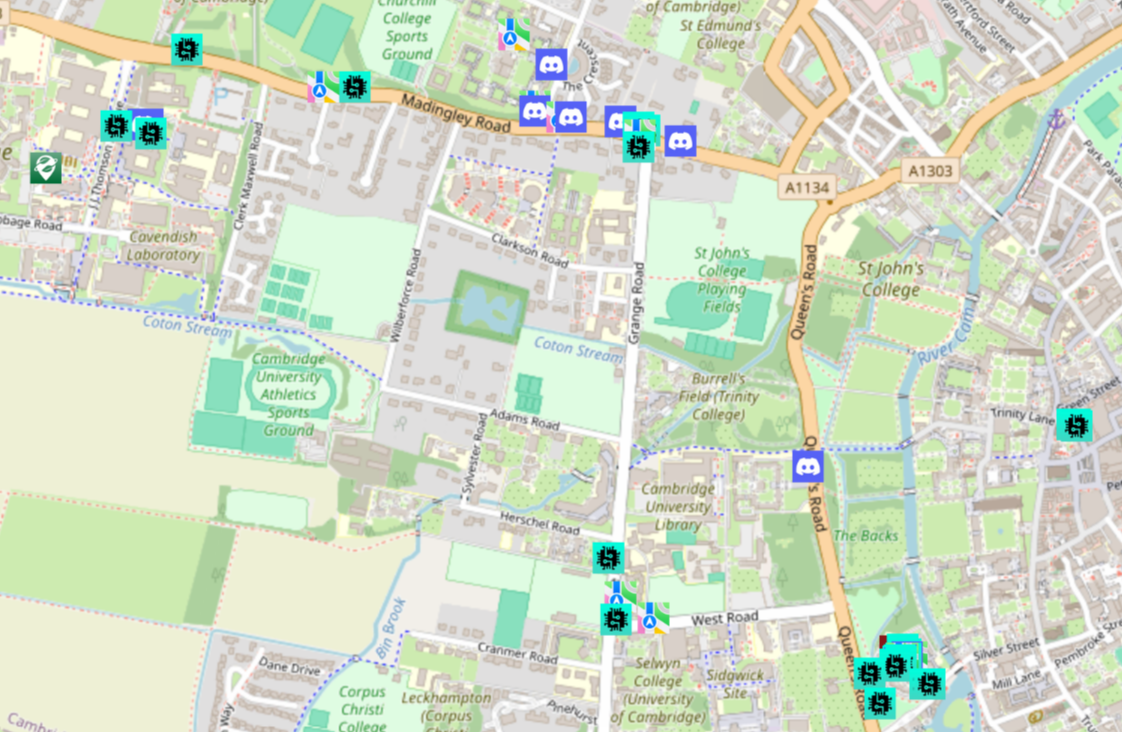
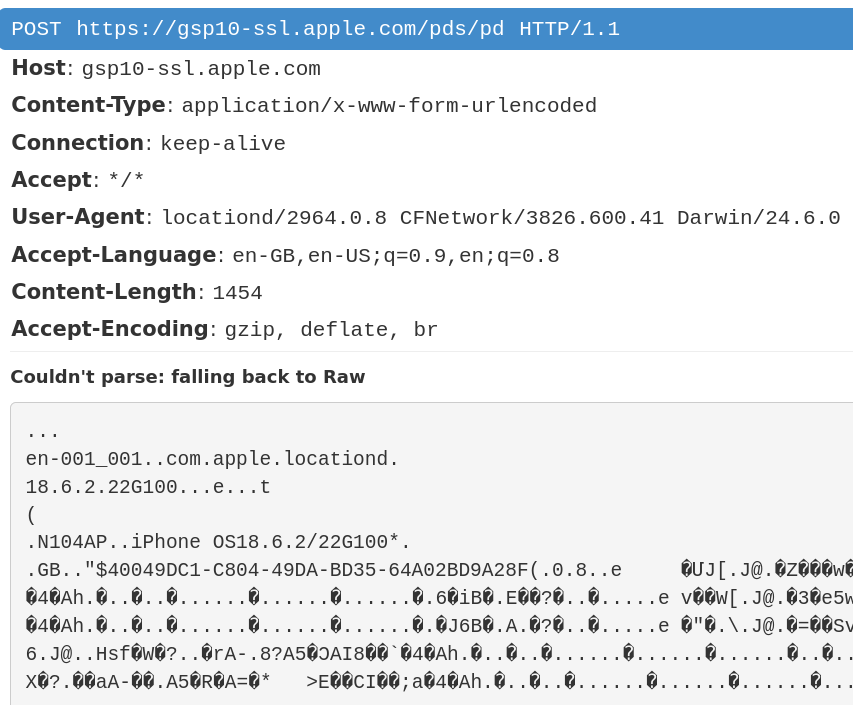
The map shows just a single request, really visualizing how densely the points are packed.
The requests also include device fingerprints (locale, OS version) and a unique UUID.
In terms of timing, requests tend to be sent while the phone is plugged in and idle. Oddly, requests also occur to be triggered when the alarm goes off.
TODO: Get a rooted phone and ripgrep through where that ID may be stored to be tied back to request
Apple Pay Merchant Information
The only associated endpoint is https://gsp-ssl.ls.apple.com/dispatcher.arpc
Decoded data from a collected request:
"6": {
  "card_type": "MasterCard",
  "currency": "EUR",
  "16": 1,
  "17": "8D0DDB68-0C2D-4A39-AD20-77454B02D876",
  "18": 0,
  "merchant": "2TL BRUSSEL - NOORD",
  "21": "",
  "timestamp": 4739811754110877696,
  "8": 0,
  "9": 1
}
-
Card provider
-
Currency
-
Transaction ID
-
Merchant name
-
Timestamp
Surprisingly, disabling the toggle only stops uploading the data - not collection. Data is stored locally until you re-enable the setting, at which point it’s uploaded. In this case, the timestamp (4739811754110877696 → Aug 30, 2025) is from a week before September 6th when this request was observed. All analytics settings were turned off at the time.
Improve Maps & iPhone Analytics
Endpoint: https://gsp64-ssl.ls.apple.com/hvr/v3/use
This endpoint doesn’t use protobuf, so decoding is limited to string analysis. Observed payloads include:
- Subsets of open apps (Network extensions like WireGuard, Mullvad, Little Snitch were observed)
- Addresses linked to the Apple account even if not currently nearby. For example, I observed multiple Cardiff addresses despite being in Cambridge. Searching through the phone reveals that they come from the Contacts app.
- IPs and ports the device is connected to
- BSSIDs
With settings disabled, requests are still sent - but reduced to just home location and timestamps.
Endpoint summary
| Domain | Path(s) | Controlled by Setting | Data Sent | Notes |
|---|---|---|---|---|
gsp10-ssl.apple.com |
/pds/pd, /au |
Routing & Traffic | GPS coordinates, travel speed, barometric pressure, app launches near POIs | Sent continuously; “anonymous” but easily linkable via app/device data |
gsp-ssl.ls.apple.com |
/dispatcher.arpc |
Apple Pay Merchant Identification | Card provider, currency, transaction ID, merchant name, timestamp | Data still collected locally when disabled; uploaded once re-enabled |
gsp64-ssl.ls.apple.com |
/hvr/v3/use |
Improve Maps & iPhone Analytics | Open apps (esp. network tools), Apple account–linked addresses, IPs and ports, BSSIDs, timestamps | Requests persist even when disabled, but with reduced detail |
gsp10-ssl.apple.com |
/hcy/pbcwloc |
Improve Location Services | Nearby BSSIDs, cell provider, location, movement/activity | Passive Wi-Fi/cell scanning; builds Apple’s positioning database |
When and where is location data collected?
Apple’s terms use vague phrases like “in transit” and “points of interest.” In practice, these cover nearly all daily activity:
- Transit applies whenever your phone is moving - whether you’re walking, cycling, or driving.
- Points of interest applies whenever you stop somewhere with a map label - your home, workplace, shops, restaurants, and so on.
The result is that your iPhone sends location data whether you’re moving or standing still - essentially all the time. During testing, I saw logs for every commute, every stop at a shop or restaurant, and every app I opened throughout the week.
Cross-request correlation and deanonymization
Apple’s traffic is highly susceptible to correlation across requests. Analytics
data is usually sent in batches by background daemons, which means requests
often share near-identical timestamps. For example, /pds/pd and /au are
almost always transmitted within milliseconds of each other, and their GPS
coordinates and timestamps can be matched to link app usage with a specific
route.
Beyond timing, every request carries device fingerprints - locale, iOS version, user agent, and IP address. Combined with the set of installed apps (which Apple already knows for each account), these details form a unique device profile. Even if Apple labels traffic as “anonymous,” the mix of app usage, device metadata, and network identifiers makes it straightforward to connect requests back to an individual user.
Privacy implications and adversaries
Passive network observer (ISP, VPN provider, DNS resolver)
- Can see frequency, timing, and size of requests, though the payload is encrypted.
- Because requests are usually sent when the phone is plugged in and idle, an observer can infer certain device states from traffic patterns. Over time, this rhythm reveals aspects of the user’s daily habits.
- Request size also correlates with movement: the more you travel, the larger the batch of location points, and thus the larger the encrypted request.
Overall, Apple’s choice to delay and batch uploads reduces what passive observers can infer in real time, but longer-term patterns still leak useful information.
Active network observer (e.g. corporate VPN with MITM)
An active network observer, such as a corporate VPN that performs MITM decryption, gains visibility comparable to Apple itself while also linking the traffic directly to employee identities.
The main risk lies in aggregation: routes and app launches recorded at home may not be uploaded immediately but instead transmitted hours later during work hours when the VPN is active. Combined across multiple employees, this delayed reporting can reveal private relationships, conversations, or off-record activities.
Governments and Apple
Consider a scenario: after an attack, investigators want to know who was present. They could compel Apple to provide all location-service requests from the area, along with the source IP addresses. With those, they can also obtain authenticated traffic sent from the same IPs, building a list of potential suspects.
That dataset would contain:
- Device metadata from ARPC requests (locale, iOS version, etc.).
- Routes taken - technically “anonymous,” but timestamped and precise.
- Lists of apps opened at specific locations.
By aligning timing between (2) and (3), investigators can link routes to app usage. Then, by cross-referencing with the list of installed apps Apple already knows per user, they can map (1) to (3) and deanonymize individuals. The reconstructed routes can also point to private addresses, workplaces, or safehouses.
In the hands of an authoritarian state, the same process could be used to monitor everyone who attended a protest, then trace each person back to their home. Hence the often-heard advice: “Don’t bring your phone to demonstrations.”
TODO:
- Cross service correlation: Other Apple system services, possibly authenticated, are sent from the same IP address and may contain information that could be matched to the "anonymous" data.
- App uniqueness: Poll on app-install combinations to demonstrate how uniquely idenntifying they are within a given population or IP range.
- Perspective of a network adversary: How much can an ISP glean from use the traffic patterns and sizes. Train a ML model. (DEAD! ML model doesn't work for motion activity due to batching and delays. Instead, we can tell how much a user has moved)
- Match paths together based on start/end points for a multi-day movement report
[WIP] Update patterns of Apple's location database
Over the course of a week, I recorded 436,771 location changes and 10,301 unique BSSIDs across 10 evenly distributed groups of 5 tile keys.
- Average distance change: 0.69 m
- Minimum distance: 0.01 m
- Maximum distance: 24.87 m
- Standard deviation: 1.01 m
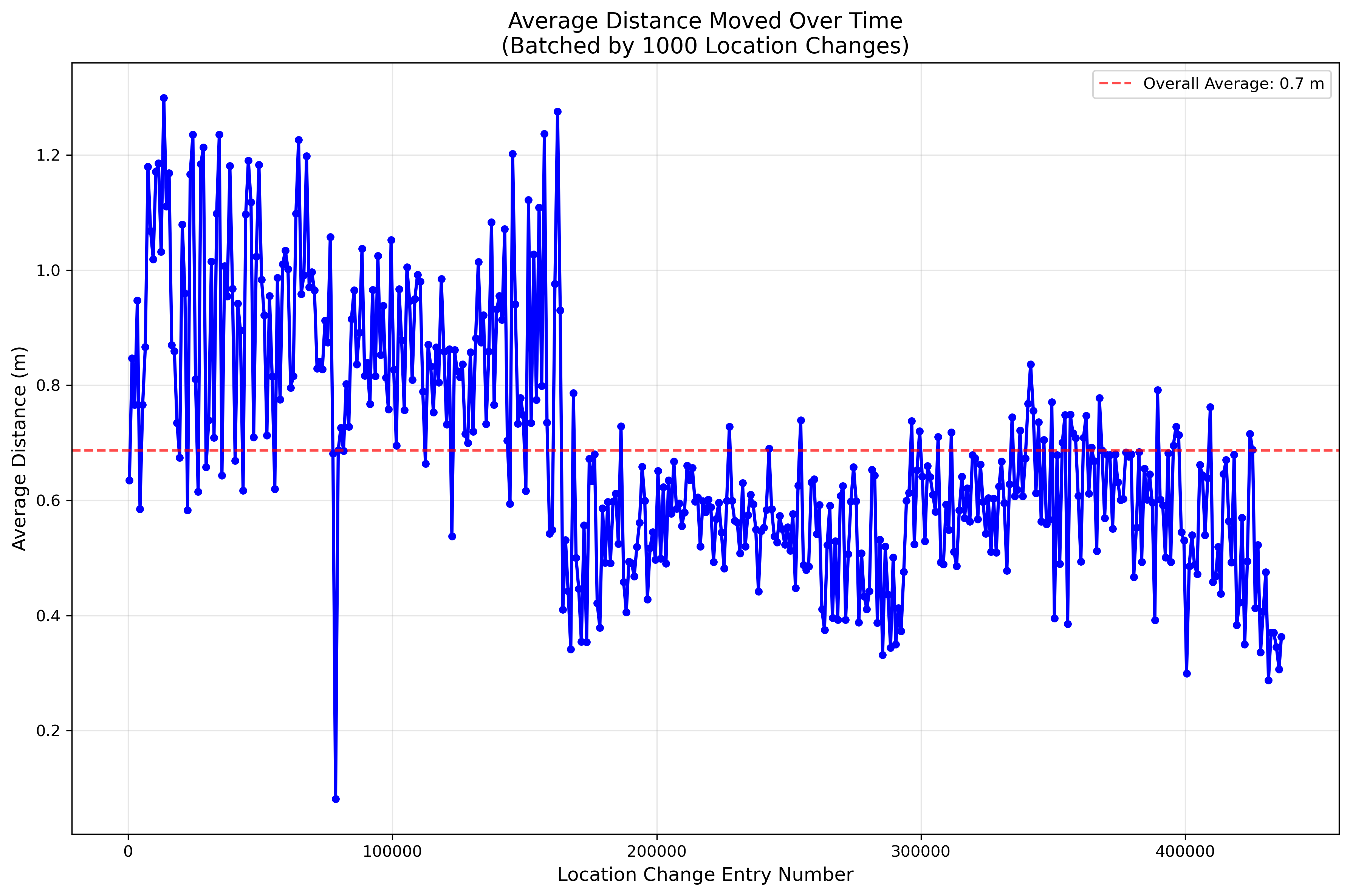
At first glance, the average distance and tight standard deviation seem artificial. Digging deeper, the update behavior looks even stranger:
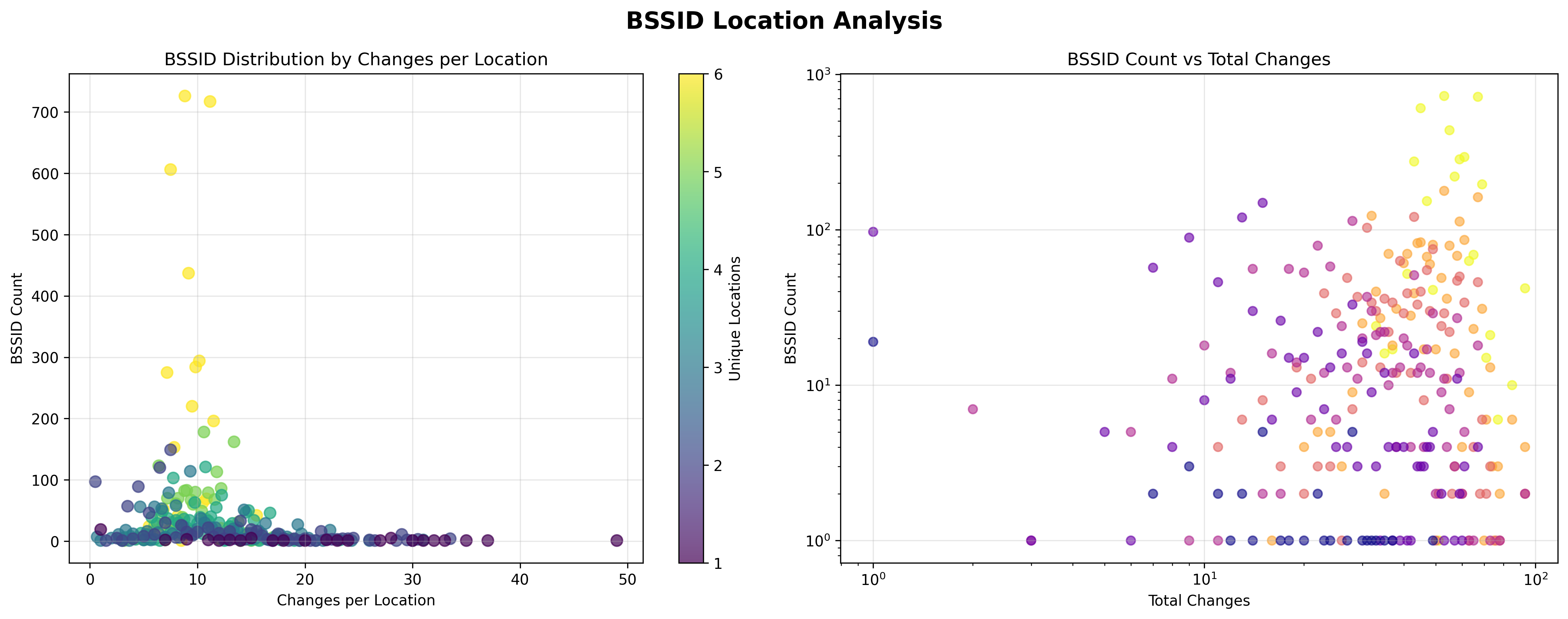
Most changes involved oscillating between just a handful of unique coordinates (typically 1–6 based on the number of days of recorded data), even though some access points showed up to 93 separate “update” events. This strongly suggests that only one genuine update occurs per day, with locations oscillating during the update window rather than reflecting real movement.
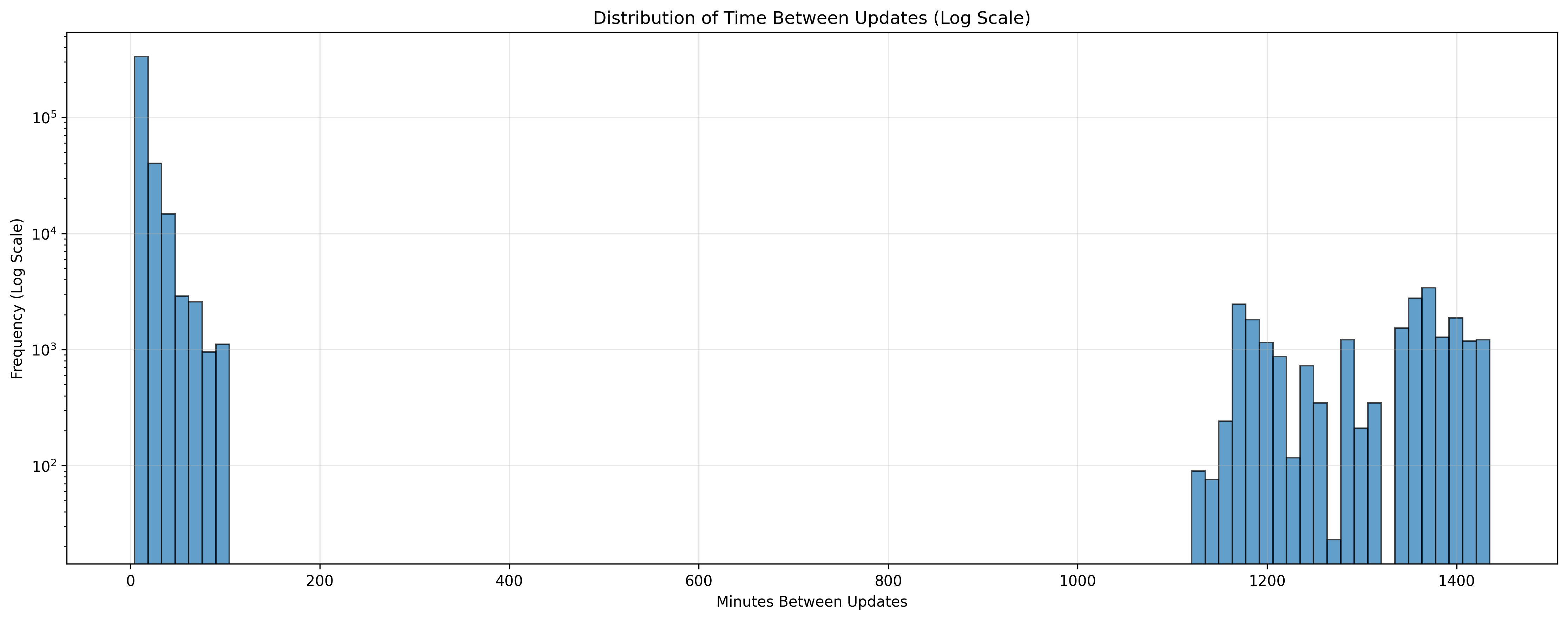
Every day, there is a consistent 5-hour update window - from 05:00 to 09:00 UTC - during which database entries are refreshed. Each access point is guaranteed at least one update every 24 hours, though many are updated multiple times within the window. This clustering explains the bursts of short intervals seen in the update graphs.
Importantly, the update windows are not isolated to specific tiles. Instead, updates occur across large numbers of tiles simultaneously, implying that Apple maintains a centralized database rather than distributed, region-specific updates.
Open questions:
- The oscillation pattern produces a distinctive distribution shape in the data. This could be intentional, perhaps as a privacy mechanism to obscure whether updates are tied to human presence.
- The artificial feel of the distances suggests further smoothing or obfuscation may be applied server-side.